

Datakart Posts

GS1 DataKart Login: How to Access, Manage, and Update Product Information Seamlessly

Search Icon
Profile

GS1 India

Feb 13, 2026

When dealing with hundreds or thousands of SKUs, inconsistent product data such as mismatched specifications, outdated info, and incorrect barcodes can lead to listing rejections, supply chain bottlenecks, miscommunication across partners, and even lost revenue. DataKart solves this problem. It’s a centralised, secure platform where businesses can log in, store, manage, upload, and update their product data, ensuring that all stakeholders work with a single source of truth. This blog will walk you through how to log in to DataKart, efficiently manage product data, keep it up-to-date, and use it to streamline supply chains, retail, and e-commerce operations.
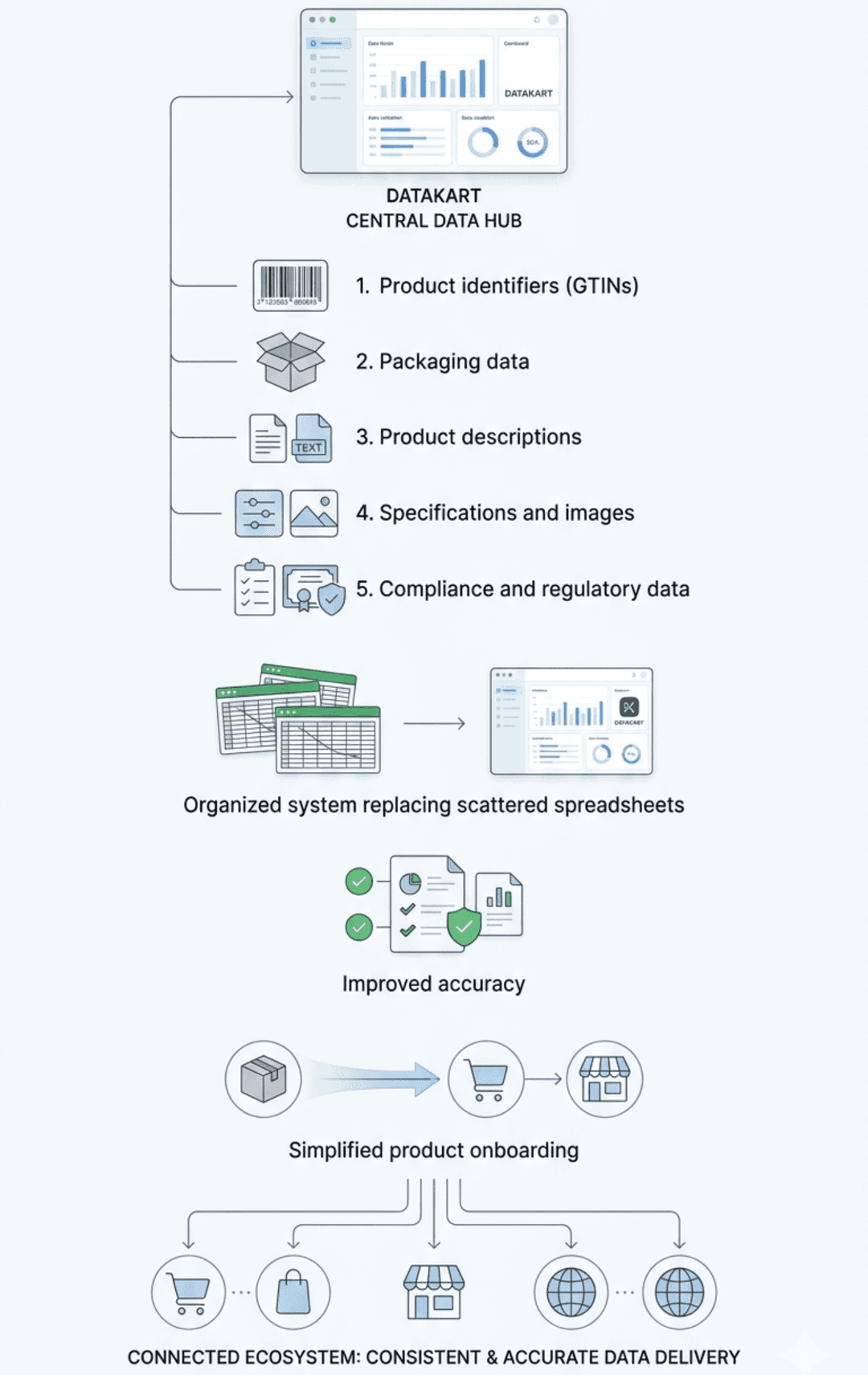
What kind of data goes into DataKart?

  • Product identifiers (GTINs)
  • Packaging data
  • Product descriptions
  • Specifications and images
  • Compliance and regulatory data

By using DataKart, brands and manufacturers can avoid fragmented spreadsheets and data silos, and ensure that product information is always up-to-date, reducing errors and enhancing compliance. It also simplifies product onboarding for retailers and marketplaces.
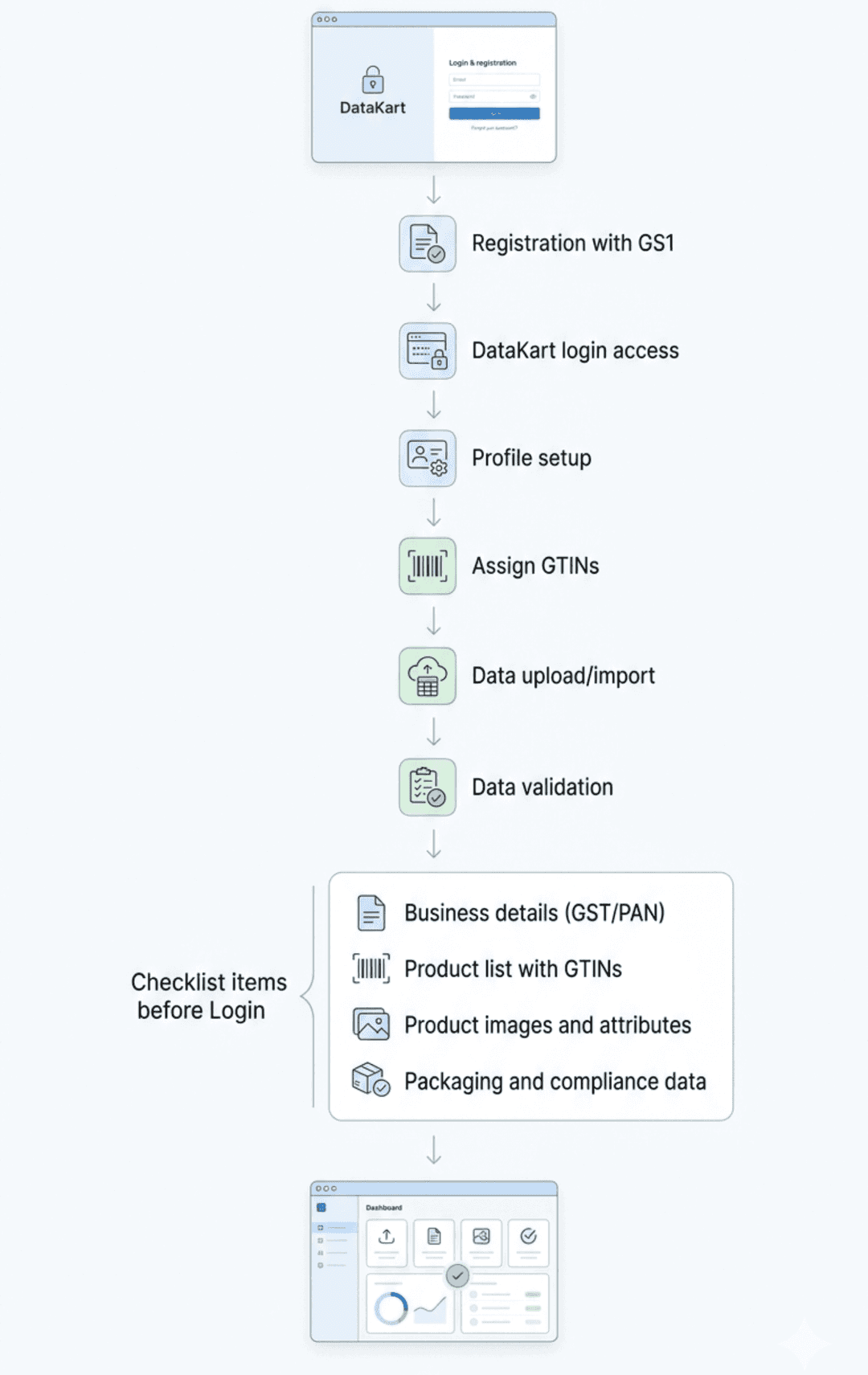
How to Get Started — DataKart Login & Account Setup

Steps to Get Started:

  1. Register with GS1 - First, you need to register with GS1 India and obtain your login credentials. This step is essential for securing globally recognised GTINs and preparing your product data for the DataKart login.
  2. Access the DataKart Login Portal - Once registered, you can access the DataKart login portal via a secure username and password.
  3. Initial Setup & Profile Configuration - Set up your company profile, providing necessary details like GST/PAN (if applicable), and specify the number of products/SKUs you manage. You can select a plan based on your business needs (basic or premium).
  4. Assign GTINs / Product Identifiers - Upload or link your existing GTINs to your product list. These identifiers are crucial for product traceability and compliance.
  5. Data Upload / Import - Import your product attributes, descriptions, images, packaging info, and compliance data in bulk via CSV/Excel or manually.
  6. Save & Validate Data - After uploading, review your data entries. DataKart will validate mandatory fields and flag any data inconsistencies before sharing.


Checklist before Logging in:

  • Brand details (GST, PAN)
  • Product list with GTINs
  • Product images and data attributes
  • Packaging and compliance information

DataKart - A Quick Overview

DataKart is a cloud-based platform designed for manufacturers, brands, and distributors to manage and standardise product information. It centralises critical product data and ensures it is consistent across all business systems.

Managing & Updating Product Information — Best Practices Within DataKart

To ensure your product data is accurate and up-to-date, follow these best practices within DataKart:

  1. Maintain a Single “Master Record” per Product - Avoid creating multiple copies of the same product entry. Always update the master record instead of multiple versions to maintain consistency across all channels.
  2. Use Consistent Attribute Naming & Data Formats - Standardise product names, units, and descriptions (e.g., size, weight, batch, expiry). Consistency helps improve data accuracy across all platforms.
  3. Leverage Version Control & Audit Logs - Track changes with DataKart’s version history and audit logs. This is crucial for compliance, recalls, and product traceability.
  4. Bulk Updates for SKU Changes or Packaging Updates - Use DataKart’s bulk upload feature to quickly update multiple SKUs at once, especially when you need to change packaging, comply with new regulations, or update attributes.
  5. Sync Product Data with Partners and Retailers - When your data is centralised and consistent, sharing it with partners, marketplaces, and retailers becomes seamless, reducing errors and preventing listing rejections.
  6. Regular Data Audits & Quality Checks - Periodically review and clean up product data. Remove obsolete entries and correct inconsistencies. Regular audits ensure your data remains accurate and reliable in the long term.

Business Benefits of PMDM for Retailers and Manufacturers

Why Use DataKart?

Here are the key benefits of using DataKart for managing your product data:
  1. Single Source of Truth - By centralising your product data, you eliminate data silos across departments. This reduces confusion, errors, and inconsistencies.
  2. Time-saving & Efficiency Gains - With DataKart, you reduce the manual effort of data entry. Bulk updates and centralised management save hours and reduce human errors.
  3. Easier Product Onboarding & Listing - When your product data is clean and consistent, onboarding new products or variants becomes much faster. Retailers, e-commerce platforms, and export partners can easily accept your products without data conflicts.
  4. Compliance & Traceability Readiness - DataKart helps ensure your product data complies with regulatory standards, improving traceability and making audits easier to handle.
  5. Scalability for Growth - As your business grows, DataKart scales to accommodate increasing SKUs and variants. It avoids the chaos of managing data across spreadsheets or multiple catalogues.
  6. Improved Partner and Retailer Trust - Sharing verified, clean product data builds trust with your partners and retailers, ensuring smoother operations and market access.


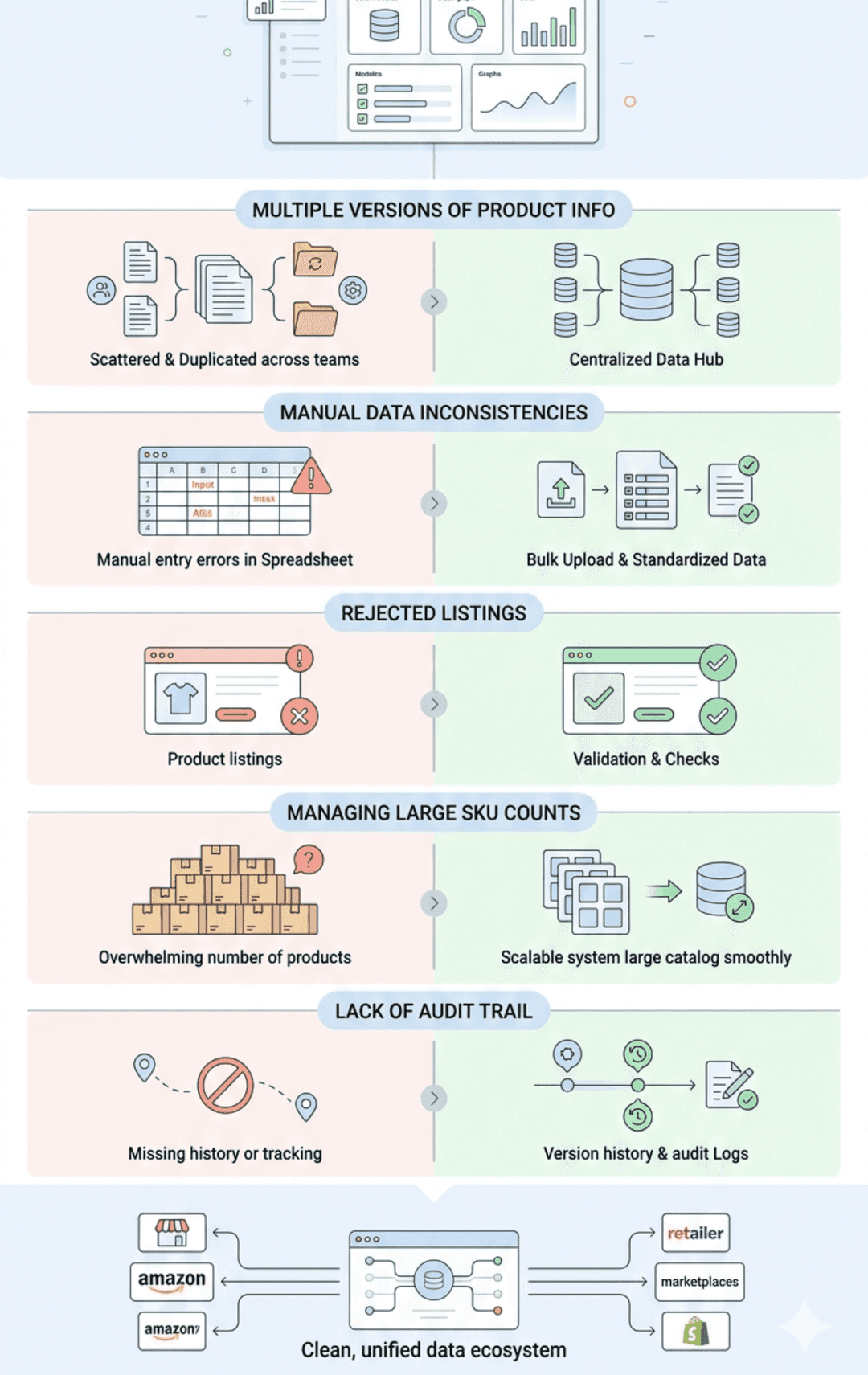
Common Challenges & How DataKart Helps Overcome Them

Here are some common challenges businesses face and how DataKart solves them:

  1. Multiple Versions of Product Info Across Teams
    Solution: DataKart’s central repository ensures uniform data across departments, eliminating confusion.
  2. Manual Data Updates Lead to Inconsistencies
    Solution: Bulk uploads and standardised attribute sets reduce human error, ensuring consistent data across platforms.
  3. Rejected Listings Due to Incorrect Data
    Solution: DataKart’s validation checks ensure completeness before product information is shared with retailers and marketplaces.
  4. Managing Large SKU Counts
    Solution: DataKart scales with your business, allowing you to handle a growing product catalogue without the risk of data chaos.
  5. Lack of Audit Trail for Changes
    Solution: DataKart’s version history and audit logs provide accountability and traceability, which is critical for compliance and recalls.

Conclusion

In today’s fast-moving retail and supply chain environment, clean, centralised product master data is essential. DataKart login provides businesses with a robust platform to manage product data efficiently and reliably. By using DataKart, businesses can ensure consistent data, reduce errors, achieve faster market readiness, and maintain compliance. Prepare your product lists and business credentials today. Get your DataKart login credentials and start managing your master data effectively to unlock supply chain resilience, growth readiness, and operational excellence.

Frequently Asked Questions

DataKart login is for registered businesses that need a secure platform to manage product data across multiple channels.

Yes, you can upload both existing and new products by linking your GTINs and adding product details.

Regular updates are recommended, especially for changes in packaging, compliance, or when launching new SKUs.

Yes, DataKart allows easy sharing of updated product data with retailers and e-commerce platforms.

DataKart is suitable for businesses of all sizes. Even small businesses can benefit from centralising their product data for better market access.

You May Also Like

Datakart Posts
Product Master Data Management: Why It Matters for Retailers and Manufacturers

February 11, 2026

Product Master Data Management...

Read More
Datakart Posts
How to Use GS1 India DataKart for Managing and Sharing Product Data Efficiently

December 10, 2025

How to Use GS1 India DataKart ...

Read More
Datakart Posts
A Guide to GS1 DataKart: Features and Benefits for Businesses

September 08, 2025

A Guide to GS1 DataKart: Featu...

Read More

Leave a Comment

Your email address will not be published. Required fields are marked *

Enquire Now For Barcodes