
A small fashion brand can have its catalogue, product photographs and inventory ready for an Amazon or Myntra launch, yet discover that its product identification details need attention before listings go live. A missing identifier, an incorrect product code or a mismatch between the listing and the physical item can create delays when stock is already packed. For emerging apparel, footwear and accessories brands, barcode preparation is part of marketplace readiness, not just a packaging task. Each size, colour or product variation needs to be handled correctly, and the barcode printed on the item must match the intended product. Sorting this out before dispatch is far easier than correcting listings or relabelling stock later.
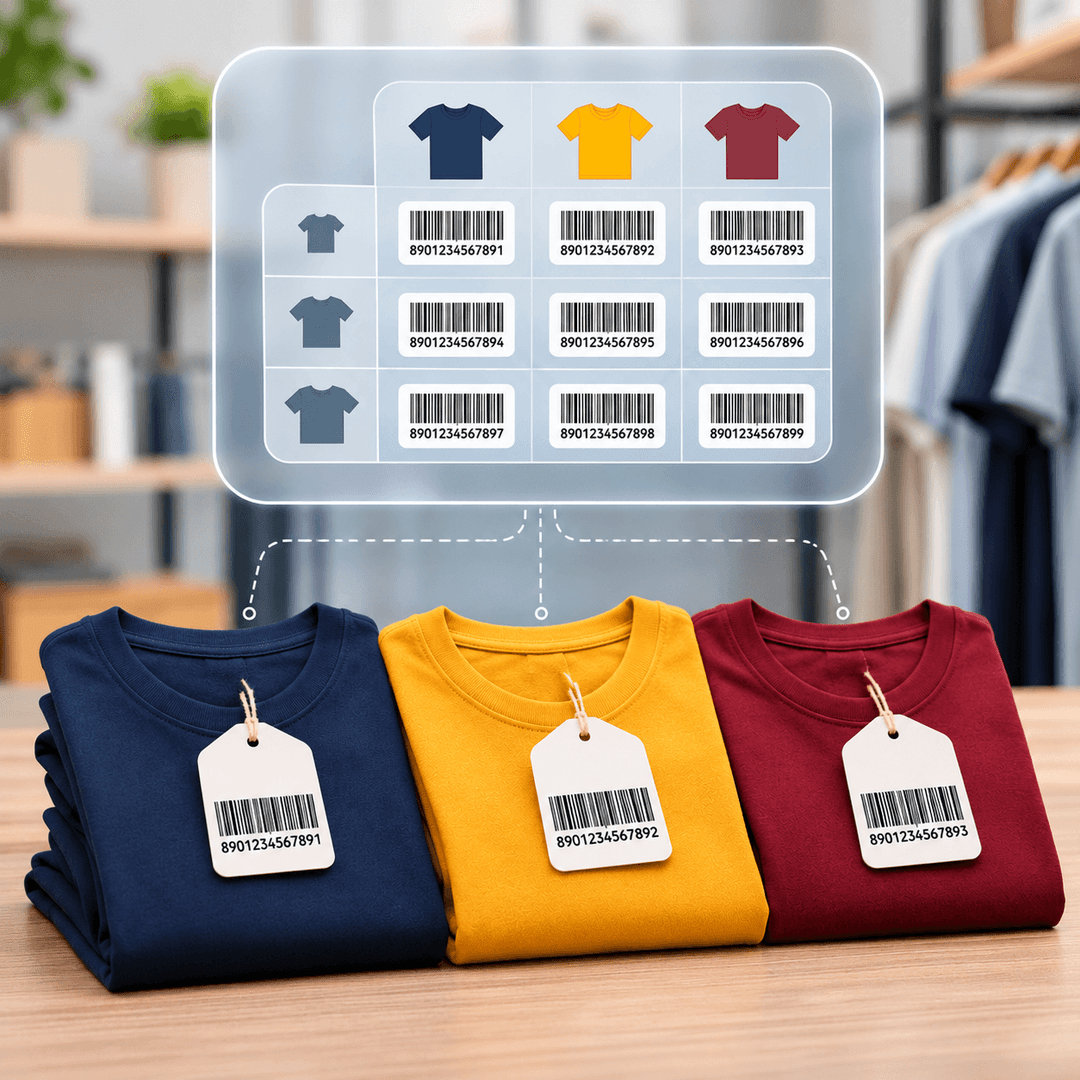
Consider a clothing brand launching a T-shirt in four sizes and three colours. Although the designs are similar, each size-colour combination represents a distinct trade item when it is separately ordered or sold. These variations generally need their own Global Trade Item Numbers (GTINs).
This is where planning matters. Brands should map their product catalogue before generating identifiers, including sizes, colours, pack configurations and other distinct variants. Assigning codes casually or reusing one across different products can create confusion in product listings and inventory operations.
A product barcode generator creates the scannable symbol from an assigned product identifier; it does not replace the process of obtaining the correct identifier. Brands should understand their marketplace requirements and source identifiers through the appropriate issuing organisation.

A barcode can be assigned correctly and still cause problems if the printed symbol is difficult to scan. Small labels on accessories, curved packaging on cosmetics or low-quality printing on apparel tags can affect readability.
Before approving bulk printing, check that the barcode matches the intended product and is clear at its final printed size. A barcode scanner online may help with certain code lookups or checks, depending on the tool. However, an online lookup does not prove that a printed label will scan reliably in a warehouse or at checkout.
Test representative printed labels using a suitable scanner. Also confirm the required label placement and format with the relevant marketplace or fulfilment provider before sending inventory.
Create a product-level checklist covering identifiers, variants, listing details, label artwork and scan testing. Use a barcode scanner online only for the checks it supports, and verify physical print quality separately. GS1 India's retail and marketplace guidance can help businesses understand product identification requirements as they prepare to sell.
Not necessarily. Amazon and Myntra may have different product identification, listing and fulfilment requirements depending on the category and selling arrangement. Sellers should check each marketplace's current guidelines before assigning identifiers or printing product labels.
Different size-colour combinations generally need separate GTINs when each is a distinct trade item sold independently. For example, a medium blue T-shirt and a large blue T-shirt typically require different identifiers for accurate product identification.
A barcode generator creates the scannable symbol, but it does not automatically provide a properly assigned GTIN. Businesses should obtain product identifiers through the appropriate issuing organisation before generating barcode artwork for their products.
An online tool may help check certain barcode information, but it cannot reliably establish whether every printed label will scan under real operating conditions. Test physical labels using suitable scanning equipment before approving large print runs.
Yes. Confirming product identifiers before printing helps brands avoid incorrect codes, replacement labels and unnecessary packaging costs. It also gives teams time to check marketplace requirements and verify that each product variation has the correct identification.
Your email address will not be published. Required fields are marked *